BIM Clash Detection ROI: Save Millions in Construction Rework
You are halfway through your project when the structural steel arrives. The HVAC ducts do not fit. Electrical conduits intersect the plumbing. The crew scrambles for solutions. A two-week delay cascades into schedule chaos. Change orders pile up. Your profit margin evaporates.
This scenario happens constantly in construction. It is so common teams just budget for it. "Yeah, we will lose 5-10% to coordination issues." That is not inevitable, it is a choice to avoid clash detection.
When done right, BIM clash detection catches these problems before they cost you anything. Before steel is fabricated, before crews mobilize, and before change orders multiply. This guide shows you exactly how, the real ROI numbers, and why smart construction firms now treat clash detection as non-negotiable.
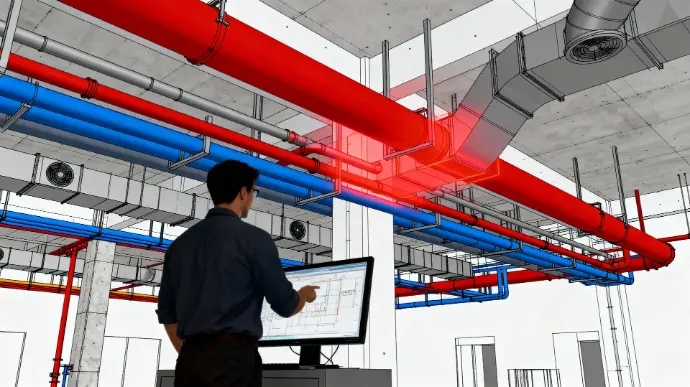
What Is Clash Detection and Why It Actually Matters
Beyond Just "Stuff Hitting Stuff"
Clash detection sounds simple: find where building systems conflict. But it is much more sophisticated than that, and the sophistication is where the value lives.
When your structural engineer places a beam, your mechanical engineer's duct needs to route around it. Your electrical contractor needs to know where conduit won't fit. Your plumber needs to coordinate water lines. In traditional construction, all this coordination happens on site, in real-time, when changes are expensive and time is short.
With BIM clash detection, it happens in a 3D model, before anyone shows up to the job site. Every conflict gets identified, documented, and resolved with alternatives visualized. No surprises. No improvisation. No panic.
The Three Types of Clashes You Need to Know
Hard Clashes:
Two physical objects occupy the same space, a beam literally intersects a duct. These are impossible to ignore because they prevent installation. Hard clashes demand immediate resolution.
Soft Clashes:
Objects come too close for practical installation. A pipe needs 6 inches clearance for a wrench if it's closer, it won't be serviceable. Soft clashes cause problems later during maintenance when technicians can not access equipment.
Workflow Clashes:
The sequence of installation creates problems. Steel gets installed before concrete is removed. HVAC gets roughed in before framing is complete. Timing matters as much as geometry.
Most teams focus only on hard clashes. Smart teams resolve all three because soft and workflow clashes create unexpected delays and inefficiencies.
MEP Coordination: Where Most Clashes Hide
Why MEP Is the Coordination Nightmare
Mechanical, Electrical, and Plumbing systems are the chaos drivers on complex projects. They share similar spaces, need different clearances, and compete for routing paths. Coordinate MEP poorly, and nothing else matters.
A typical commercial building might have:
50+ miles of ductwork (HVAC)
20+ miles of electrical conduit
15+ miles of plumbing and hydronic lines
Hundreds of connection points where systems must interface
Route each discipline independently, and they'll fight each other constantly. Route them collaboratively through BIM, and they integrate smoothly.
Why MEP Coordination Fails Without BIM
Traditional coordination happens through coordination drawings, 2D plans created by hand-marking hard copy drawings. Information gets lost, miscommunication happens, and what looks fine in 2D sometimes does not work in 3D reality.
Contractors show up expecting to install systems that do not actually fit. They improvise and call engineers for change orders. They lose time. Projects spiral.
With BIM-based MEP coordination, all three disciplines model their systems in 3D, within a shared environment where clashes are automatically detected. Problems become visible before they are built.
The Clash Detection Process: Step-by-Step
Phase 1: Model Preparation and Validation
Before clash detection happens, models need to be clean. You are looking for:
Complete and accurate geometry for all building systems
Proper organization (walls, structure, MEP all in logical layers)
Consistent coordinate systems across disciplines
Defined clearance requirements for each trade
This takes time, but sloppy models create noise and thousands of false positives that waste everyone's time.
Phase 2: Defining Clash Rules and Tolerances
Not every intersection matters. Electrical can pass through structural concrete with proper sleeves. Ducts might cross pipes as long as they don't touch. You define what "counts" as a clash.
This requires collaboration between disciplines to establish realistic rules:
What's a hard clash vs. acceptable proximity?
What clearances does each system need?
Which clashes take priority?
Get this wrong, and you either find meaningless clashes or miss real problems.
Phase 3: Running Automated Clash Detection
Software like Navisworks automatically scans millions of potential intersections and flags clashes based on your rules. Modern tools typically find 50-500 clashes on mid-sized projects.
The automation is powerful, but it's not magic. You're only as good as your inputs. Bad rules = bad results.
Phase 4: Clash Review and Resolution
This is where the real work happens. A coordination team (architects, engineers, contractors) meets weekly to review clashes:
Is this a real problem or a false positive based on inaccurate modeling?
Who resolves it? (usually the most flexible trade)
What's the solution? (reroot, relocate, change elevation, enlarge opening?)
Who updates the model with the resolution?
This iterative process typically takes 4-12 weeks depending on project complexity.
Phase 5: Documentation and Contractor Communication
Resolved clashes get documented, marked in the BIM model, shown in coordination drawings, and communicated to all trades. Contractors know what has been resolved and why.
This documentation prevents "I didn't know about that" surprises during construction.
Real ROI Numbers: What Clash Detection Actually Saves
The True Cost of an Unresolved Clash
Let's be specific. Research from major construction firms and industry studies shows:
Scenario: Single unresolved hard clash discovered in the field
Crew stops work to assess
Site supervisor calls project engineer: 2-4 hours
Engineer consults with design team and contractor: 4-8 hours
Solution is developed: 8-24 hours
Revision drawings created: 4-8 hours
Materials are rerouted or re-fabricated: $5,000-$50,000
Crew loses productivity: $2,000-$10,000 per day × 3-5 days
Ripple effects on downstream work: $10,000-$50,000
Single clash impact: $30,000-$150,000 in costs and delays
Multiply that by 50-200 clashes that typically happen in a project without coordination, and you are looking at $1.5M-$30M in problems.
Typical Clash Detection Investment vs. Savings
$5M commercial building example:
Clash detection investment:
BIM coordination for 16 weeks: $35,000
Coordination meetings (team time): $12,000
Software and tools: $5,000
Model updates and revisions: $8,000
Total investment: $60,000
Expected outcomes:
Clashes detected and resolved: 120
Unresolved clashes prevented: 120 × $40,000 average = $4,800,000
Schedule acceleration: 4-6 weeks saved = $150,000+ (reduced overhead)
Improved productivity: fewer field delays = $200,000+ (increased throughput)
Improved quality: fewer hasty improvised solutions = $100,000+ (reduced warranty issues)
Conservative total savings: $5.2M
ROI: 8,600% (87x return on investment)
That is not marketing fluff, that is math from real projects.
How ROI Scales with Project Size
| Project Value | Coordination Cost | Expected Clashes | Potential Savings | ROI |
| $2M small commercial | $15,000 | 30-50 | $1.2M-2M | 80-130x |
| $5M mid-size | $35,000 | 80-120 | $3.2M-4.8M | 90-140x |
| $15M large | $80,000 | 150-250 | $6M-10M | 75-125x |
| $50M+ complex | $150,000+ | 300-500 | $12M-20M+ | 80-130x |
Pattern: Clash detection ROI stays consistent around 80-140x across project sizes. Bigger projects have bigger clashes, so savings scale linearly.
Who Actually Performs Clash Detection?
Build In-House vs. Hire External Coordination
Build Your Own Coordination Team:
Pros:
Direct control and cultural integration
Team learns your standards and workflows
Can handle ongoing projects seamlessly
Builds institutional knowledge
Cons:
High fixed costs ($80k-120k annually per coordinator)
Requires training and mentoring
Slow ramp-up and mistakes are expensive
Underutilized during slow periods
Hire External Coordination Services:
Pros:
Pay only for what you use
Experienced coordinators who know best practices
Faster project turnaround
No training or hiring overhead
Can scale up or down based on project pipeline
Cons:
Less cultural integration
External team may not know your standards initially
Dependency on external vendor
Potential communication delays
Reality: Most construction firms use hybrid approach including core coordination capabilities in-house, and external support when project volume spikes.
What to Look For in a BIM Coordination Service
If you are hiring external coordination, look for:
Relevant experience: Coordinators who have worked on projects similar to yours
Disciplinary expertise: Understanding MEP systems, not just software
Proven process: Documented clash detection workflows, not ad-hoc approaches
Communication: Regular meetings, clear documentation, responsive to questions
Software competency: Fluent with Navisworks, Revit, and your coordination tools
Liability: Professional insurance and quality guarantees
The right coordination partner becomes an extension of your team, not just a vendor checking boxes.
Common Coordination Mistakes (And How to Avoid Them)
Mistake #1: Starting Coordination Too Late
Many teams begin clash detection during design development. By then, major decisions are locked in. Changes are expensive.
Better approach: Start coordination during schematic design when flexibility is highest and changes are easiest.
Mistake #2: Treating Clash Detection as One-Time Activity
A single coordination effort catches most obvious clashes. But projects evolve, as design changes create new conflicts that old coordination misses.
Better approach: Phase coordination aligned with project phases. Schematic coordination. Design development coordination. Construction document coordination. Each phase adds detail and catches new issues.
Mistake #3: Not Involving All Trades
Some firms coordinate only between major systems. But specialty contractors (fire protection, audiovisual, security, vertical transportation) also need coordination.
Better approach: Include all MEP disciplines plus structural, fire protection, and any specialized systems from day one.
Mistake #4: Poor Model Quality Going In
Garbage in, garbage out. If models are incomplete or inaccurate, clash detection wastes time finding false positives.
Better approach: Establish model quality standards before coordination begins. Require models to meet LOD 300 minimum with clean geometry and proper organization.
Mistake #5: Ignoring Soft Clashes
Teams focus on hard clashes (things touching) but ignore soft clashes (things too close). Then contractors struggle during installation because they can't actually access equipment for maintenance.
Better approach: Define and resolve both hard and soft clashes. Include clearance requirements for access, installation, and future maintenance.
Mistake #6: Not Updating Models After Coordination
The worst scenario: coordinate everything, resolve all clashes, then contractors build from old models that don't include coordination solutions.
Better approach: Coordination solutions must feed directly into construction documents. Update models, issue coordination drawings, and communicate clearly what changed and why.
Clash Detection Tools and Software
Industry Standard: Navisworks
Navisworks is the clash detection powerhouse. It consolidates models from different software (Revit, AutoCAD, Civil 3D, etc.), analyzes intersections, and visualizes problems in 3D.
Strengths:
Handles massive models (100+ million elements)
Powerful clash detection algorithms
Integration with Revit and other Autodesk tools
Comprehensive reporting and documentation
Cost: $500-$600 annually
Specialized Alternatives
Solibri Model Checker:
Strong for model validation and code compliance checking alongside clash detection. Popular with firms doing detailed code analysis.
BIMvision:
Free clash detection viewer for analyzing models without buying expensive software. Good for contractors who need to review coordination without creating models.
Tekla Warehouse:
Integrates structural and MEP coordination directly into modeling environment. Preferred for heavy industrial projects.
Revit Navisworks Plugin:
Built-in clash detection within Revit. Good for basic coordination; lacks some Navisworks power but convenient for integrated workflows.
Reality: Navisworks dominates because it is flexible, powerful, and handles the complex, multi-discipline consolidation that other tools struggle with.
The Coordination Timeline: From Start to Finish
Here is what a realistic clash detection engagement looks like:
| Phase | Timeline | Activities |
| Setup & Planning | Week 1-2 | Define scope, coordinate requirements, team structure |
| Model Prep | Week 2-4 | Validate models, establish quality, organize files |
| Initial Coordination | Week 5-8 | Run clash detection, catalog issues, initial review |
| Resolution Meetings | Week 8-14 | Weekly coordination meetings, resolve clashes systematically |
| Documentation | Week 14-16 | Finalize solutions, update models, create coordination drawings |
| Contractor Communication | Week 16-18 | Issue coordination documents, conduct coordination meetings with trades |
| Post-Award Coordination | Ongoing | Monitor model updates, flag new clashes, maintain coordination |
Total engagement: 16-20 weeks for typical mid-size project
Some projects require longer coordination; others wrap faster. The timeline depends on project complexity and how quickly teams can make decisions.
When to Do Clash Detection: Project Phase Guidance
Schematic Design Phase
Focus: Spatial conflicts, major system routing
Early coordination prevents wasted design effort. Better to discover major routing problems during schematics when changes are simple.
Design Development Phase
Focus: System interfaces, clearances, connection details
As systems get more specific, coordination becomes more detailed. This phase typically catches 70-80% of project clashes.
Construction Documents Phase
Focus: Final conflicts, installation sequence, shop drawing coordination
Late-stage coordination prevents expensive field surprises. Sometimes called "pre-construction coordination" because it happens right before construction.
Pre-Construction Phase
Focus: Contractor-specific coordination, installation sequencing, site logistics
Contractors add practical knowledge about installation methods that sometimes reveal coordination issues design teams missed.
During Construction
Focus: As-built conflicts, change order coordination, punch-list conflicts
Ongoing coordination manages changes and responds to field conditions. Less desirable (because it is reactive) but sometimes necessary.
Building Your Coordination Program: Getting Started
For Small Firms (1-10 projects/year)
Hire external coordination services for each project. Build in-house expertise gradually through exposure to external coordinators best practices.
Investment: $40k-$80k annually for 5-10 projects
For Mid-Size Firms (10-25 projects/year)
Hire one dedicated coordinator. Supplement with external support during heavy project periods.
Investment: $100k-$150k annually (1 coordinator + external support)
For Large Firms (25+ projects/year)
Build dedicated coordination team. Hire multiple coordinators, establish internal standards and processes, develop proprietary workflows.
Investment: $250k-$500k+ annually for full internal team
Implementation Timeline
Year 1: Establish process, hire external support, build team knowledge
Year 2: Expand internal capability, reduce external dependence, develop standards
Year 3+: Mature coordination program, consistent ROI across all projects
Frequently Asked Questions
Clash detection identifies where building systems (structural, MEP, architectural) occupy the same space or conflict. It matters because unresolved clashes cost $30k-$150k each when discovered in the field. Detecting them early in BIM saves millions.
Typically $30k-$80k for mid-sized commercial projects, or roughly 0.5-1.5% of project cost. ROI averages 80-140x, so every $1 spent on coordination saves $80-$140 in field conflicts.
Hard clashes are two objects physically occupying the same space and they are impossible to ignore. Soft clashes are objects too close for practical installation or maintenance. Both need resolution, but soft clashes are often overlooked.
Do I need to hire a BIM manager?Not universally, it depends on your work. ArchiCAD excels for design-focused architecture; Revit dominates complex MEP coordination.
Start during schematic design when changes are easiest and cheapest. Continue through design development and construction documents. Late-stage coordination is less ideal but still valuable.
It depends on your project volume. Small firms benefit from external services. Large firms build in-house teams. Most mid-size firms use hybrid approach including core team plus external support during peaks.
Typical mid-size project coordination takes 16-20 weeks from start to finish. Speed depends on project complexity, how quickly teams make decisions, and model quality.
Yes. Research shows firms that coordinate save 5-15% on projects through reduced rework, fewer change orders, better schedule adherence, and improved productivity. The ROI is quantifiable and consistent.
Navisworks is industry standard. Solibri, BIMvision, and Tekla are specialized alternatives. Most coordinators use Navisworks because it handles complex multi-discipline consolidation best.
Navisworks consolidates models from any software (Revit, AutoCAD, ArchiCAD, etc.) through standard formats like IFC. File compatibility is rarely a real barrier.
Projects under $2M with simple MEP typically don't justify full coordination. But selective coordination (MEP only, or major interfaces) often makes sense even on smaller work.